
01 / The idea
Change the tool without rebuilding the toolbox.
Some useful phone tools are small: a checklist, a timer, a little game. Rebuilding and reinstalling a whole Android application for every change to one of those tools is a heavy development loop. But giving downloaded JavaScript unrestricted access to the phone would be a very different—and much less bounded—experiment.
Construct puts a Kotlin/Compose host between those two extremes. The host installs signed HTML/CSS/JavaScript packages, runs them in a restricted WebView, and exposes a small, versioned set of native operations. Modules own their interface and domain logic. The host owns installation, access decisions, lifecycle handling, and device integration.
There are therefore two delivery lanes. A module that only needs existing APIs can ship as a new signed ZIP. A capability the host does not have yet needs Kotlin work, native tests, and a new APK. Adding Snake exercised the first lane. Adding camera support exercised the second.
We will follow a package into the host, trace a native request, build a small counter example, and then look at the development and testing process that turns a candidate into something worth putting on a phone.
02 / The components
The registry delivers. The phone executes.
The path from source to a running module
Build side · module deliveryWebView requests → origin-scoped bridge → native access checks → bounded storage, tones, contacts, or native camera UI.
1. A package is a contract, not just a web page
The manifest names the module, version, entry point, API target, and requested capabilities, including a human-readable reason for each. The implemented runtime is webview-js; a broader schema is not evidence that other runtime kinds work. At this snapshot, the native validator accepts exact API targets from 0.1.0 through 0.6.0.
The publisher validates the source, builds a bounded ZIP, computes its SHA-256, and signs the package bytes using RSA/SHA-256. The catalog carries the digest and signature. Versions are immutable: changed content gets a new version. The artifact is written durably before the catalog references it.
2. Transport trust and publisher trust are different
HTTPS authenticates the registry connection. The native package validator separately checks the pinned publisher signature, digest, manifest compatibility, ZIP paths, and size limits before code becomes runnable. A signature tells us who authorized those bytes; it does not tell us the code is harmless.
There is another identity entirely: the Android APK signer, which controls compatible host updates. Keep that separate in your mental model from the publisher key pinned inside the host. Testing packages from one publisher against an APK pinned to another should fail.
3. Installed code and saved data have different lifetimes
ModuleStore tracks trial and working versions, previous code, grants, diagnostics, and per-module data. An update can be tried and rolled back without throwing away the tool’s saved state. But rollback restores code, not a historical database. If version 2 rewrites saved data into a format version 1 cannot understand, the module author still has a migration problem.
Once installed, the tool runs locally. Neither Discord nor an LLM connection sits in the path of a Snake move or a counter increment. The workshop and the runtime are separate systems.
03 / Crossing into native code
A declared capability is not a blank cheque.
The host serves each module from a local, module-specific HTTPS origin and injects an origin-scoped message interface. JavaScript sends JSON containing a request ID, method, and parameters. The host accepts only the expected origin and main frame; it derives module identity from the installed session, not a caller-supplied ID.
Requests are bounded to 8,192 characters and 30 per second, with additional limits per operation. A request still needs a declared capability, a saved module grant, a valid session, and—where relevant—Android permission. Sensitive asynchronous results are checked again before delivery. Revoking access while a contacts lookup is in flight must not let an old reply slip through.
Explore the native access gates
For a contacts read, these four conditions must hold. Module storage has no Android runtime-permission requirement.
- 1. DeclarationRequired
- 2. Module grantRequired
- 3. Android permissionRequired for contacts / camera
- 4. SessionMust remain authorized
A native gate decision does not prove the operation will succeed. Provider availability, quotas, rate limits, parameter validation, and operation-specific lifecycle rules still apply.
Different capabilities deliberately return different things
- Storage: JSON values in a per-module key space, bounded to 100 keys and 64 KiB of serialized UTF-8 data. Not a general filesystem API.
- Tones: two short native patterns, subject to rate and audio-policy checks. “Accepted” means submitted for native playback, not that anyone heard it. The tone grant is not a universal switch for every possible WebView audio mechanism.
- Contacts: bounded searches and details through opaque session references, not caller-selected provider URIs or SQL. A search can page through up to 200 results. Intentional Browse is allowed; a grant is not a per-contact privacy boundary.
- Camera: permission to open a native human-operated workspace. JavaScript gets an acknowledgement, not image bytes, live frames, a shutter command, or a file path.
Camera photos begin in a bounded private album. Alpha 12 adds a separate native Save to phone gallery action on Android 10+: explicit confirmation, a pending MediaStore item, an exact byte copy, and a final access check before publication. The exported copy is independent of the private original and may be backed up by the user’s photo app. The module cannot invoke export through the bridge.
Similarly, revoking contacts access prevents later authorized reads; it cannot retroactively erase information a module already saved under a separate storage grant. Access boundaries need to describe that reality, not promise an undo button they do not have.
04 / The app around the module
Rotation, menus, and leaving the app are not the same event.
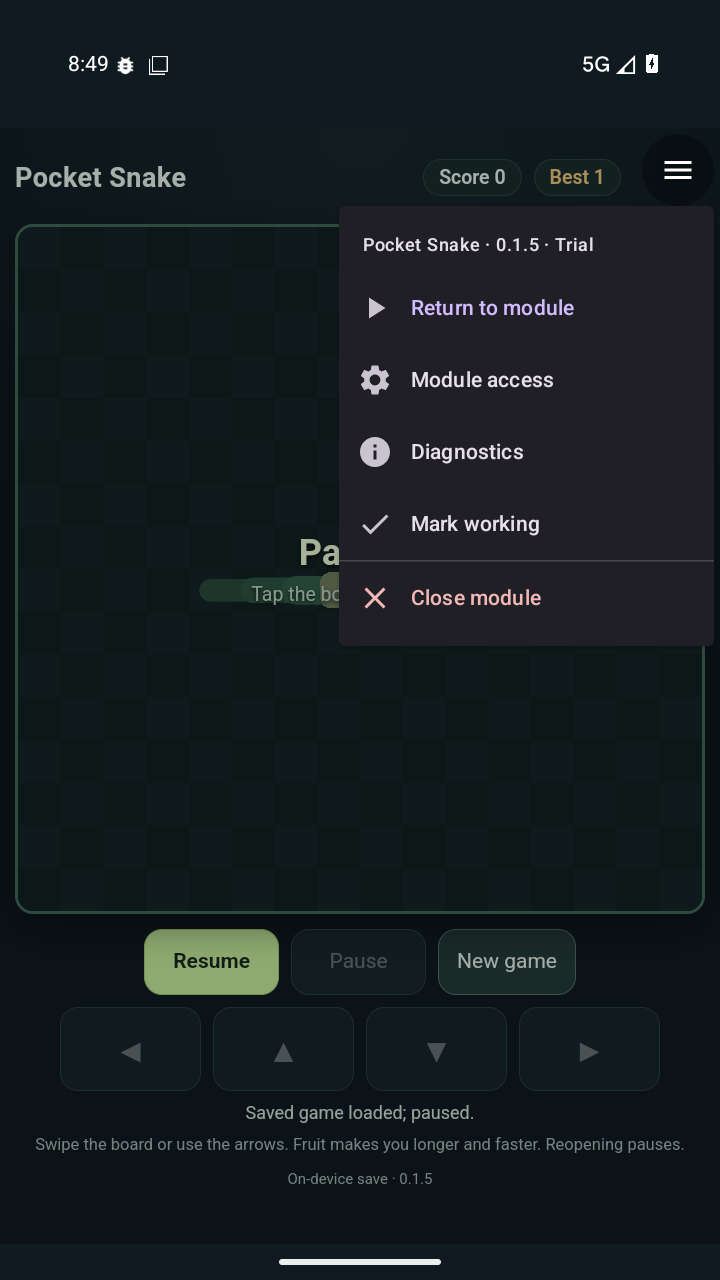
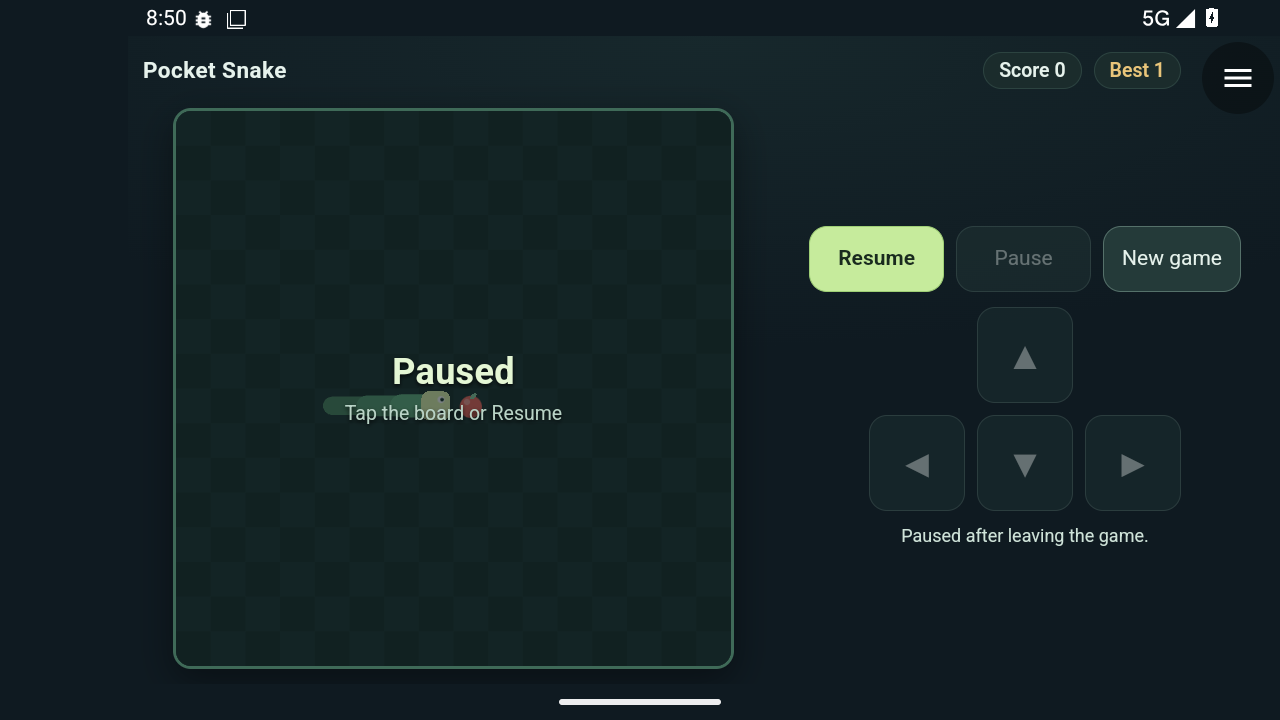
The native shell gives modules most of the screen, with a small host-owned corner menu. API 0.6 provides a host stylesheet with CSS variables for reserving that corner and an optional validated theme colour for the native edges.
Rotation retains the web session and resizes the WebView. Snake chooses to pause rather than unexpectedly resume or catch up on missed moves. The menu gates native effects and invalidates stale personal-data replies; an already submitted storage save may finish. Modules receive an advisory visibility event, but enforcement cannot depend on JavaScript cooperating.
Real backgrounding ends the web runtime. Reopening reconstructs the tool from saved state. Focus is consequently a foreground timer, not a background alarm service. The native camera has its own policy: rotation or backgrounding closes the workspace and releases the camera, while saved photos remain.
These distinctions turned out to matter as much as the happy-path APIs. “Pause” is not one universal lifecycle state, and a menu overlay does not prove every JavaScript timer has stopped.
05 / Try it
Start with a counter. Follow one saved value.
This exercise uses Construct’s existing Hello Module, so there is a complete runnable example behind the snippets. You will bootstrap a publisher identity, build a host with matching signed fixtures, and package an update. Use a fresh checkout and disposable emulator; no reference-lab endpoint or agent subscription is required.
Step 1: prepare the pinned source
Reference prerequisites: Linux, Git, Python 3.10+ with venv support, Node.js 20+, JDK 17, and Android SDK platform 35/build-tools 35.0.0. Configure JAVA_HOME and ANDROID_HOME for your installation and provision the Android SDK licenses. Builds download Gradle and Maven dependencies. The host minimum is Android API 28.
git clone https://github.com/blueworkslabs/construct.git construct-tutorial
cd construct-tutorial
git checkout 658d3112fac9871a3c85bf91d5c7c675c81bcdb0
python3 -m venv .venv
. .venv/bin/activate
python3 -m pip install 'cryptography>=41'
python3 scripts/prepare_fixtures.py
The bootstrap creates the signed Hello assets, the public key pinned by the host, synthetic JVM fixtures, and example catalogs under ignored dist/fixtures. It keeps the private publisher key outside the checkout, in the operator’s local signing directory. Never put that directory into a repository or serve it with the catalog. See the build guide for configuring a separate development identity.
Step 2: understand the manifest and the bridge
Hello’s complete manifest points to ui/index.html, targets API 0.1.0, and requests storage, toast, and logging. Its storage declaration is:
{
  "id": "storage.kv",
  "reason": "Keep this module's counter between launches."
}
The protocol is small enough to inspect directly. This is the shape of a single read; the complete example supplies the request map, timeouts, and error handling:
// Install the handler before sending a request.
construct.onmessage = event => {
  const reply = JSON.parse(event.data);
  // Match reply.id to the pending request.
  // Read reply.result OR handle reply.error.
};

construct.postMessage(JSON.stringify({
  id: 'read-count-1',
  method: 'storage.kv',
  params: { op: 'get', key: 'count' }
}));
The runnable app.js wraps that transport in a Promise-based call() helper. Its save function waits for the host before showing the new count:
async function save(value) {
  await call('storage.kv', { op: 'set', key: 'count', value });
  count = value;
  document.querySelector('#count').textContent = count;
}
Notice where persistence happens: not in a registry request and not in a chat message, but inside the host’s per-module store. This tiny demo is a learning aid, not a production state-management abstraction. A faster interactive tool also needs to serialize overlapping saves; Snake uses a single in-flight save and a visible pause on storage error.
Step 3: run the local checks and build
python3 -m unittest discover -s scripts -p 'test_*.py'
python3 -O -m unittest discover -s scripts/android-runner -p 'test_*.py'
python3 -m unittest discover -s server -p 'test_*.py'
node scripts/test_snake.cjs
node scripts/test_focus.cjs
node scripts/test_contacts.cjs
node scripts/test_camera.cjs
./gradlew --no-daemon :core:app:testDebugUnitTest \
  :core:app:lintDebug :core:app:assembleDebug --max-workers=1
The debug APK is written to core/app/build/outputs/apk/debug/app-debug.apk. Install it on your chosen disposable emulator, open Construct, and install/open the bundled Hello demo. Increment the counter, close the module, then reopen it: the count should survive. A normal desktop browser will not supply construct; opening the HTML there is not native integration testing.
This builds a default host with system TLS trust and no preconfigured remote registry. The bundled exercise needs no registry. Debug signing is for development; this is not a universal APK that can update somebody else’s differently signed installation.
Step 4: package a new version, without rebuilding the host
Edit the existing greeting in examples/hello-module/ui/index.html. Stage only the manifest and runtime assets: this example directory also has a README, which the publisher correctly rejects as an unsupported package file. Then publish into a new local candidate catalog with a new version:
mkdir -p dist/tutorial-source
cp examples/hello-module/manifest.json dist/tutorial-source/
cp -R examples/hello-module/ui dist/tutorial-source/
python3 scripts/publish_module.py dist/tutorial-source \
  --output dist/tutorial-candidates --version 0.3.0 --latest
Expected output: an index.json and a signed dev.construct.hello-0.3.0.zip in the candidate directory. The version override also replaces the example’s __VERSION__ placeholders. No new native API was added, so the same host can run the update.
This command packages locally; it does not upload anything. To test remote delivery, provision your own HTTPS origin and serve only the catalog and ZIPs, using the registry setup instructions. Add that HTTPS index URL in Construct, refresh, and update Hello. Confirm the changed greeting and retained count. Mark a known version working before trying another candidate; use rollback to check code recovery without assuming it rewinds data.
Change the version again for the next edit. Reusing 0.3.0 with different bytes should be rejected. Do not erase that guard just to make the publishing command succeed.
06 / The workshop
Agents help build it. Artifacts carry it forward.
Our working loop starts with a human goal and a small acceptance contract: what should the tool do, what may it access, what must survive interruption, and what would count as a failure? Astra handles the implementation and deployment loop; Codex and Fable contribute reviews, and Fable also contributed Snake’s presentation work. The human steers trade-offs and performs focused phone checks. These are workshop roles and contributions, not a requirement to use those agents.
OpenClaw supplies the workspaces and tool access. Chat is useful for requests and review, but it is not a package transport or a runtime dependency. The publisher, Gradle build, registry, and Python Android driver are ordinary tools that humans can also run. The value of the loop is the handoff discipline, not a particular model’s name.
Two artifact lanes, one acceptance loop
- Contract + local checksDefine success, denial, persistence, and interruption. Test the affected layers.
- Freeze candidatesBuild the optimized APK; record its signer and hash. Sign versioned module ZIPs.
- Disposable Android runVerify snapshot restoration. Install the exact APK and fetch the candidate modules.
- Inspect the evidenceReview structured results, screenshots, failures, and explicit exclusions.
- Promote accepted bytesCopy tested artifacts, publish the catalog last, verify served hashes and signatures.
- Focused phone feedbackCheck touch, sound, cameras, and vendor behaviour. Feed the findings into the next contract.
The test bench separates build/signing work from an on-demand Linux runner with KVM acceleration. The reference runner has 6 GiB RAM and 2 vCPU; its Android guest uses 2 GiB, while the emulator process needs more headroom. Those are reference settings, not universal minimum requirements.
There are separate app-free snapshots for normal tests and synthetic-camera tests. Changing camera backends broke snapshot assumptions, so restoration is verified rather than merely requested. The controller uses SSH; ADB and emulator control remain local to the disposable runner. Signing keys stay on the build side, and fixture contacts and photos are synthetic or otherwise non-personal test material.
The driver works through real Android and WebView controls, permission dialogs, and native providers. It waits for stable targets and observable results, writes structured receipts, and stops the emulator on success or failure. A script sending a tap is not evidence that Android completed the requested action.
07 / What counts as evidence?
Different tests answer different questions.
- Deterministic JavaScript tests
- Exercise game rules, timer state, persistence decisions, and module behaviour quickly. They cannot establish how the scripts integrate inside Android’s actual WebView.
- Python publisher and runner tests
- Check package immutability, validation, configuration, and driver failure handling. A passing driver unit test does not mean a phone has installed anything.
- JVM/Robolectric tests and lint
- Exercise native contracts, authorization, bounds, lifecycle decisions, and failure cleanup. They are valuable before a device run, not substitutes for one.
- Hosted CI
- Bootstraps an independent publisher identity, runs local contracts, and builds the safe-default debug host at this pinned snapshot. It catches clean-checkout failures. It is not the external exact-pilot-APK emulator acceptance suite.
- Exact-artifact Android acceptance
- Checks installation, update/rollback, offline reopening, permissions, native providers, interruption, and renderer recovery against identified bytes. Screenshots add visual evidence that a machine verdict alone may miss.
- Human hardware checks
- Answer the questions emulation leaves open: whether controls feel good, a tone is audible and comfortable, or a vendor photo app shows the exported image correctly.
The broader alpha 11 evidence ledger is another dated baseline. Its accepted scopes combine complete runs and clean continuations on identical APK bytes. They were not one uninterrupted all-green parent run. Counts from either ledger are historical observations, not test results for your newly built APK or the later vision branch.
Probe vocabulary matters, too. BLOCKED requires explicit native evidence of blocking. CONTAINED may mean the host stopped a module after a JavaScript error; it does not prove no packet left the device. A missing event or timeout is not evidence of successful isolation.
The failures that improved the system
- Scripts passed separately, then collided together. A game and bridge helper declared the same global name. The signed Android candidate failed. A combined-script check addressed the integration gap.
- A board existed, but was too small to use. Screenshot review exposed an undersized Canvas layout that a presence check accepted. Minimum rendered-size assertions and portrait/landscape review followed.
- The contacts provider had its own sorting behaviour. Reversed insertion order and duplicate-name fixtures exposed incorrect paging hidden by tidy test data.
- A longer list broke the driver’s scroll assumption. Earlier child scopes had passed, but the parent stayed failed. The remaining checks were completed in an explicitly scoped continuation rather than relabelling the failed run.
- Clean-checkout CI lacked an Android tool. The first public workflow failed because
sdkmanagerwas absent. Explicit SDK provisioning fixed a reproducibility issue the configured build machine had hidden.
One issue remains particularly instructive: WebView accessibility descendants can intermittently disappear after native camera dialogs and direct Reopen, even while controls are visibly rendered. A fresh host launch restores the tested path. The camera regression explicitly uses that workaround and excludes direct-Reopen accessibility. A successful retry does not mean the underlying issue is fixed.
That is why receipts record scope, failures, and environment changes alongside successes. The test harness itself is software under development. When it breaks, fix it—but preserve the distinction between an application fix, a driver correction, and a narrower test path.
08 / Take it further
Keep the seams visible.
The useful result is not “an agent made an app.” It is a system where small changes have explicit contracts, device access stays behind native gates, candidate bytes have identities, and acceptance claims have evidence you can inspect.
For a first experiment, change an existing module without adding a capability. For a deeper one, follow a native operation from manifest declaration through its bridge handler, lifecycle gate, test, and Android acceptance scope. Keep failure behaviour in the design from the beginning.
Production trust and key rotation, authenticated registry distribution, broader device coverage, and stronger hostile-module isolation remain open work. LAN discovery is not implemented in this snapshot. On-device face/common-object detection is being developed separately; it should not be mistaken for identity recognition, emotion inference, or an already accepted release feature.
There is no claim here to have invented web modules, Android emulation, CI, or agent-assisted development. The experiment is putting them together tightly enough that the next small tool can travel from an idea to a phone with a trail worth reading.
Source map
Read the implementation alongside the tutorial.
Implementation and evidence links below are pinned to 658d311, the merged gallery-export snapshot. Repository main and open pull requests will continue to change.
- Architecture and module API: contracts, limits, and lifecycle.
- ModuleWebView.kt and GalleryExport.kt: the bridge and a native transaction.
- Complete Hello example, build guide, and reproduction guide.
- Workflow case study, runner setup, and hosted CI definition.
- Evidence ledger, gallery acceptance, and security boundaries.
Screenshots are unaltered synthetic-game emulator captures from Construct’s public media directory, used under its MIT license. Diagrams are native HTML/CSS: responsive, readable without JavaScript, and dependency-free. The interactive gate explorer is explanatory only.